Mastering Raw Aesthetics: How to Elevate Your Designs with the Brush Stroke Elements Set
In the rapidly evolving world of digital design, there is a growing appreciation for imperfection. While sleek, vector-perfect lines have their place, modern audiences are increasingly drawn to visuals that feel human, tactile, and authentic. This is where the Brush Stroke Elements Set becomes an invaluable resource for creators. Whether you are a seasoned graphic designer or a social media manager looking to add flair to your posts, understanding how to leverage raw, artistic textures can transform your work from generic to captivating.
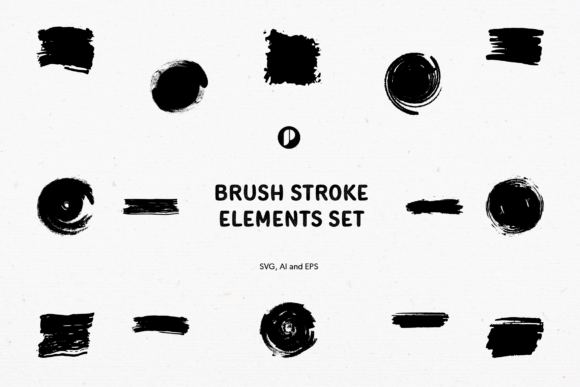
This article explores the purpose and significance of incorporating rough brush touches into your projects. We will examine why this specific set—featuring circles, rectangles, and squares—is a versatile tool for modern creativity, and how its technical features make it accessible for users of all skill levels.
The Rise of Imperfection in Digital Design
For years, digital design was synonymous with precision. Grids were rigid, colors were flat, and edges were sharp. However, as our lives become increasingly digitized, there is a psychological counter-movement toward warmth and humanity. Designers are now seeking ways to bridge the gap between the cold screen and the warm hand of the artist. This is often referred to as "organic minimalism" or "raw aesthetics."
The Brush Stroke Elements Set fits perfectly into this trend. By introducing a rough and raw brush touch, you break the monotony of standard layouts. These elements serve as decorative accents that draw the eye without overwhelming the content. They suggest movement, energy, and creativity, making them ideal for brands that want to appear approachable and dynamic rather than corporate and stiff.
Why Choose Geometric Shapes with Organic Textures?
One might wonder why a brush stroke set would focus on geometric forms like circles, rectangles, and squares. After all, brush strokes are typically associated with freeform splashes or calligraphy. The genius of this specific set lies in the juxtaposition of structure and chaos.
- Circles: Often used to highlight key information, profile pictures, or calls-to-action. A rough-edged circle feels less like a button and more like a hand-drawn spotlight.
- Rectangles: Perfect for framing text blocks or creating background layers for quotes. The raw edges soften the rigidity of the box, making the text feel more integrated into the design.
- Squares: Ideal for social media templates, particularly for Instagram posts or product showcases. They provide a stable base while the textured edges add visual interest.
By combining familiar geometric shapes with unpredictable brush textures, designers create a balance that is both orderly and exciting. This duality helps guide the viewer’s eye naturally through the composition.
Practical Applications Across Industries
The versatility of the Brush Stroke Elements Set means it is not limited to one type of project. Its utility spans across various mediums, proving its relevance in modern professional workflows.
- Social Media Templates: In a feed saturated with polished images, a post featuring a raw brush stroke background stands out. It stops the scroll by offering a tactile visual experience that feels personal and curated.
- Presentation Decks: Corporate presentations can often feel dry. Adding subtle brush accents to slide headers or section dividers can inject energy and keep the audience engaged without distracting from the data.
- Poster Design: For event promotions, music gigs, or art exhibitions, these elements provide an immediate artistic vibe. They suggest creativity and boldness, aligning well with cultural events.
- Web Design: Used as section dividers or background overlays, these SVG-based strokes can add depth to a landing page. They break up large blocks of white space, making the website feel more inviting.
Technical Features That Empower Creators
While the aesthetic appeal is crucial, the practical usability of a design asset determines its long-term value. The Brush Stroke Elements Set is engineered with user experience in mind, ensuring that even beginners can achieve professional results.
High-Resolution and Color Accuracy
Quality is non-negotiable in professional design. This set offers 15 element designs rendered at 300 DPI (dots per inch). This resolution ensures that whether you are printing a large poster or viewing a high-density mobile screen, the edges remain crisp and the texture retains its detail. Furthermore, the files are provided in RGB colors, which is the standard color model for digital screens, ensuring that what you see on your monitor is exactly what your audience will see online.
Organization and Editability
One of the most frustrating aspects of using third-party assets is dealing with messy files. This set addresses that pain point directly. The layers are well organized and properly named. This means you do not have to waste time hunting for the correct layer to change a color or adjust opacity. Everything is intuitive.
Additionally, the ability to easily edit Colors and Curves gives you complete creative control. You can match the brush strokes to your brand’s specific palette instantly. If you need a softer look, you can adjust the curves to reduce contrast; if you need something bold, you can increase the saturation. This flexibility ensures the assets adapt to your project, not the other way around.
Scalability and File Formats
Perhaps the most significant feature for modern web and print design is scalability. The set includes SVG, AI, and EPSv8 file formats.
- SVG (Scalable Vector Graphics): Ideal for web design. These files are lightweight and scale infinitely without losing quality, ensuring fast load times and sharp visuals on any device.
- AI (Adobe Illustrator): The industry standard for vector editing. This allows designers to manipulate individual anchor points if they wish to customize the shape further.
- EPSv8: A highly compatible format that works with a wide range of design software, ensuring that users who do not have the latest Adobe suite can still utilize the assets effectively.
Because these are vector-based, you can scale the elements from the size of a business card to the size of a billboard without any pixelation. This future-proofs your design investment.
How to Create a Project with a Rough and Raw Touch
To truly understand the value of this set, let us walk through a simple conceptual process for creating a social media graphic.
First, select a square brush stroke from the set to serve as your frame. Place it centrally on your canvas. Next, choose a contrasting color that aligns with your brand identity. Because the layers are easy to edit, this takes seconds. Then, insert your photograph or text inside the square. The rough edges of the brush stroke will naturally frame the content, drawing attention inward.
To add depth, you might layer a circle stroke behind the main subject, slightly offset. This creates a sense of dimension and movement. Finally, ensure your text is legible by keeping it clean and sans-serif, allowing the raw texture of the brushes to be the star of the show. The result is a design that feels handcrafted yet professional.
Conclusion
The Brush Stroke Elements Set is more than just a collection of graphics; it is a toolkit for adding soul to digital designs. By combining the structure of geometric shapes with the organic beauty of raw brush textures, it offers a unique solution for modern design challenges. With its high-resolution output, organized layers, and scalable vector formats, it empowers creators to produce high-quality work efficiently.
Whether you are designing for social media, print, or the web, embracing the imperfect, human touch of these elements can help your work resonate more deeply with your audience. In a digital world that often feels sterile, a little bit of raw texture goes a long way.