Maximizing Design Impact with Ripped Paper Vector Elements in Modern Creative Workflows
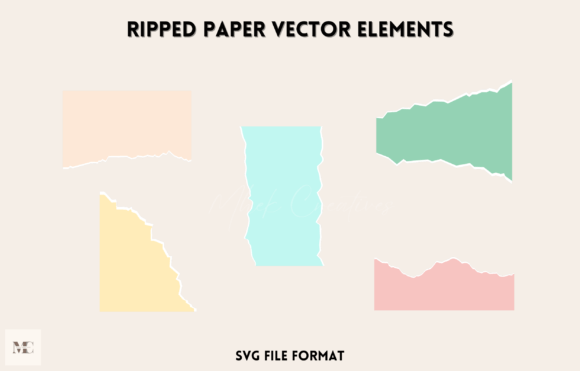
In the evolving landscape of digital and print design, texture plays a pivotal role in establishing visual hierarchy and emotional resonance. Among the myriad of textural assets available to designers, Ripped Paper Vector Elements have emerged as a versatile tool for adding organic imperfection to otherwise rigid layouts. This specific set of five SVG-format assets offers a unique blend of tactile realism and technical flexibility, making it suitable for a wide array of applications ranging from social media graphics to large-scale poster designs.
Understanding when and how to integrate these elements requires more than just aesthetic preference; it demands a clear grasp of file formats, scalability needs, and the specific demands of your creative project. This analysis explores the distinct advantages of using vector-based ripped paper effects, compares them to raster alternatives, and provides practical guidance on selecting the right resources for your workflow.
The Distinct Advantage of SVG Format in Texture Design
When evaluating texture packs, the file format is often the most critical decision factor. Many designers are accustomed to using PNG or JPEG files for torn paper effects. While these raster formats can provide high-resolution detail, they come with inherent limitations regarding scalability and file size. Ripped Paper Vector Elements, delivered in SVG (Scalable Vector Graphics) format, address these limitations directly.
SVGs are mathematically defined paths rather than pixel grids. This means that whether you are designing a small Instagram story icon or a massive billboard advertisement, the edges of the ripped paper remain crisp and clean. There is no pixelation, no blurring, and no loss of quality regardless of the scale. For professionals working across multiple media types—such as web design, print media, and digital presentations—this scalability ensures consistency without the need to maintain multiple versions of the same asset at different resolutions.
Furthermore, SVG files are typically lightweight compared to high-resolution raster images. This contributes to faster loading times on websites and more manageable project files in design software. For web designers concerned with performance metrics, using vector elements for decorative textures can be a strategic choice that balances aesthetic appeal with technical efficiency.
Comparing Vector Textures to Raster and Manual Methods
To make an informed decision about incorporating Ripped Paper Vector Elements into your toolkit, it is helpful to compare them against other common approaches: high-resolution raster scans and manual creation.
- Vector vs. Raster Scans: Raster scans of actual torn paper offer unparalleled photorealism, including fiber details, shadows, and lighting variations. However, they are difficult to recolor and require careful masking to blend seamlessly with backgrounds. Vector elements, while stylized, offer complete control over color, opacity, and shape. They are ideal for graphic design styles that favor bold, clean lines over photorealistic grit.
- Vector vs. Manual Creation: Creating custom ripped paper effects manually in software like Adobe Illustrator is time-consuming. It involves complex path manipulation and brush work to achieve a natural look. A pre-made set of five well-crafted vector elements saves significant hours of labor, allowing designers to focus on composition and messaging rather than asset creation.
- Stylization vs. Realism: It is important to note that vector ripped paper is inherently stylized. If your project requires hyper-realistic textures—such as a vintage photograph restoration—raster images may be more appropriate. However, for modern graphic design, branding, and digital media, the clean, adaptable nature of vector shapes often integrates more harmoniously with typography and other geometric elements.
Versatility Across Creative Projects
The utility of this five-element set extends far beyond simple decoration. Its adaptability makes it a valuable resource for various professional contexts. Here is how these elements can be effectively deployed across different mediums:
Print and Poster Design
In print media, particularly posters and flyers, ripped paper effects are frequently used to create depth and layering. By placing text or images behind a vector tear, designers can create a "cut-out" effect that draws the viewer’s eye to key information. Because SVGs print sharply at any size, they ensure that the edges of the tear do not appear jagged or aliased, maintaining a professional finish even in large-format prints.
Digital Media and Web Design
For web designers, SVGs are natively supported by all modern browsers. This allows for dynamic interactions, such as changing the color of the ripped paper element via CSS based on user theme preferences (light mode vs. dark mode). This level of interactivity is impossible with static raster images. Additionally, the small file size contributes to better page load speeds, a crucial factor for SEO and user experience.
Social Media and Content Creation
Social media platforms thrive on visually engaging content that stands out in crowded feeds. Ripped paper textures can break up solid color blocks, add urgency to announcement posts, or frame product images in a way that feels organic and handcrafted. The ease of resizing SVGs means that a single asset can be adapted for stories, posts, and profile banners without quality loss.
Evaluating Fit: When to Use This Resource
While Ripped Paper Vector Elements are highly versatile, they are not a universal solution for every design challenge. Understanding their best-fit scenarios helps prevent misuse and ensures optimal results.
Ideal Use Cases:
- Brand Identity Projects: When a brand aims for a raw, authentic, or eco-friendly aesthetic, vector tears can soften corporate rigidity.
- Event Promotions: Concert posters, workshop flyers, and sale announcements benefit from the energetic, disruptive visual language of torn edges.
- UI/UX Accents: Subtle use of vector textures can add warmth to digital interfaces without compromising usability.
Potential Limitations:
If your design relies heavily on photographic realism or complex lighting effects, vector shapes may appear too flat. In such cases, consider combining vector elements with subtle drop shadows or blending modes to integrate them more naturally into photorealistic compositions. Additionally, while the set includes five distinct shapes, highly specialized projects may require custom-drawn vectors to match specific compositional needs.
Practical Tips for Integration
To maximize the value of your Ripped Paper Vector Elements, consider the following practical techniques:
- Layering: Do not rely on a single tear. Layer multiple elements with varying opacities and colors to create depth and complexity.
- Color Harmony: Since SVGs are easily editable, match the fill color of the paper elements to your brand palette or complementary colors in your design. Avoid using pure black or white unless necessary, as off-whites and soft grays often look more natural.
- Typography Pairing: Ripped paper effects pair well with bold, sans-serif fonts or distressed typefaces. Ensure that text placed over or under the tear remains legible by adjusting contrast appropriately.
- Export Settings: When exporting for web use, optimize your SVG code to remove unnecessary metadata. For print, ensure that your design software handles vector transparency correctly to avoid unexpected rendering issues.
Making the Right Choice for Your Workflow
Selecting the right design assets is a balance between quality, efficiency, and suitability. Ripped Paper Vector Elements offer a compelling combination of these factors for designers who value scalability and ease of use. They bridge the gap between the organic feel of hand-torn paper and the precision of digital design.
Before committing to any resource, evaluate your specific project requirements. If you need rapid deployment across multiple formats and sizes, the SVG format provides a distinct advantage over raster alternatives. If your project demands photorealistic texture, you may need to supplement these vectors with high-resolution images. However, for the majority of modern graphic design tasks—from social media posts to comprehensive brand kits—this set of five vector elements provides a robust, flexible foundation for creative expression.
By understanding the technical benefits of SVGs and the aesthetic implications of ripped paper textures, you can make more informed decisions that enhance both the visual impact and functional performance of your designs. Whether you are a seasoned professional or an emerging creator, integrating these elements thoughtfully can elevate your work, adding a touch of organic authenticity to your digital and print projects.